
KASANEGI

LANGUAGE APP · KASANEGI

Read the same manga in two languages, one layered over the other

kasanegi is an app for language learners. It layers the Japanese and English editions of the same manga page by page on your device. Move the round lens, and only the area inside it switches to the other language.

Page images are handled only on your device. We never send them to our servers.

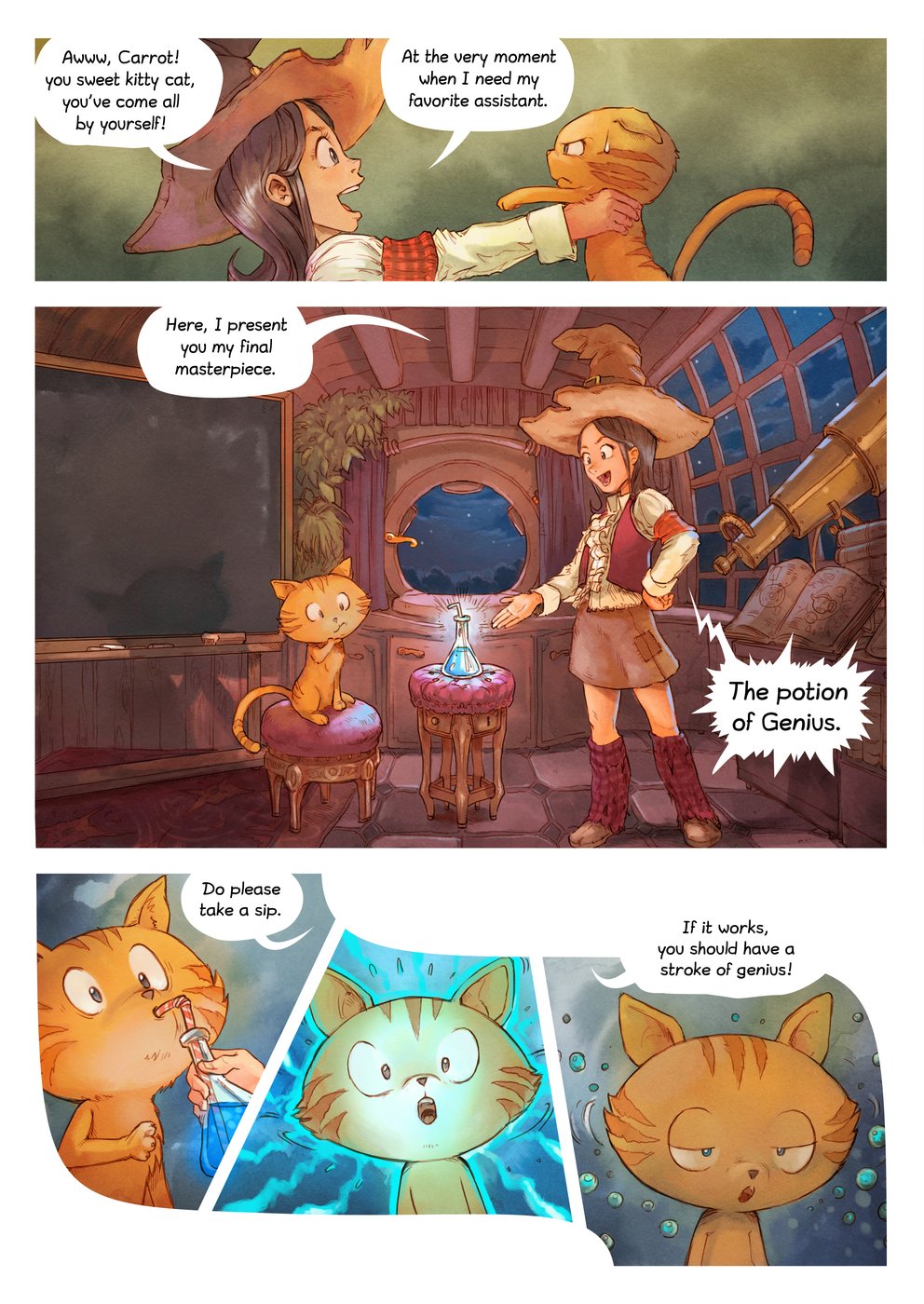
A page from Pepper&Carrot, episode 4. A round lens moves over the Japanese edition, and the English balloon shows only inside the lens.
David Revoy, Pepper&Carrot, episode 4 · CC BY 4.0

DEMO

Try it in your browser

The demo layers the official Japanese and English editions of Pepper&Carrot, episode 4, which David Revoy publishes under CC BY 4.0. Move the pointer over the Japanese page, or run your finger across it. The same spot from the English edition appears inside the circle.

The alignment is computed right in your browser. It finds matching points on the two editions of a page and fits the English page to the shape of the Japanese one. No image is sent anywhere.

  • MoveMove the lens with the pointer, a finger or the arrow keys.
  • PagesSwitch pages with the 1, 3 and 6 buttons.
  • SizeChange the lens radius with the slider.
  • SwapSwap the top and bottom editions to see the Japanese edition over the English one.
  • Your imagesChoose images of the same page in two language editions to try it with them.

The only file the demo loads from outside is OpenCV.js, which it uses for alignment. Open the demo on its own page

HOW IT WORKS

Three steps to a layered page

Language editions of the same manga are usually made from the same original artwork. The main difference is the text in the speech balloons. kasanegi uses this to find the pages, and the places on them, where the drawings match.

  1. Pages of the Japanese and English editions, joined by lines where the drawings match. The cover and an extra page have no partner. Japanese English no partner no partner

    1. Match the pages

    Page order is not assumed. For each English page, kasanegi picks the 8 Japanese pages whose 64-bit signatures, computed from downscaled pages, are closest, then tries to align the drawings against each of them. Among the pairs that align, the one with the most matching points is kept. Pages that exist in only one edition, such as covers and extras, are left without a partner.

  2. A Japanese page and a slightly tilted English page, with lines joining matching points on the drawings. The balloon text is not used for matching. Japanese English

    2. Align by the drawings

    Feature points (SIFT) are matched across the two pages. Balloon text differs from edition to edition, so small dark areas that look like text are left out of matching. From the matched points, MAGSAC estimates a projective transform that maps the whole page. The transform is accepted only when the shape of the mapped corners, the area ratio and the spread of the points all check out.

  3. A round lens over a Japanese page, with the English balloon visible only inside the lens. Inside the lens: English Outside: Japanese

    3. Show only inside the circle

    The transform maps the other edition onto the shape of the page you are reading. The other edition appears only inside the lens; outside it, the page stays in the edition you are reading. You can check just the balloons you want in the other language.

PRODUCTS

Products

01 · Python

The page-matching core

A program that pairs pages from two language editions and aligns their drawings. It is written in Python with OpenCV and handles the first two steps above: page matching and alignment.

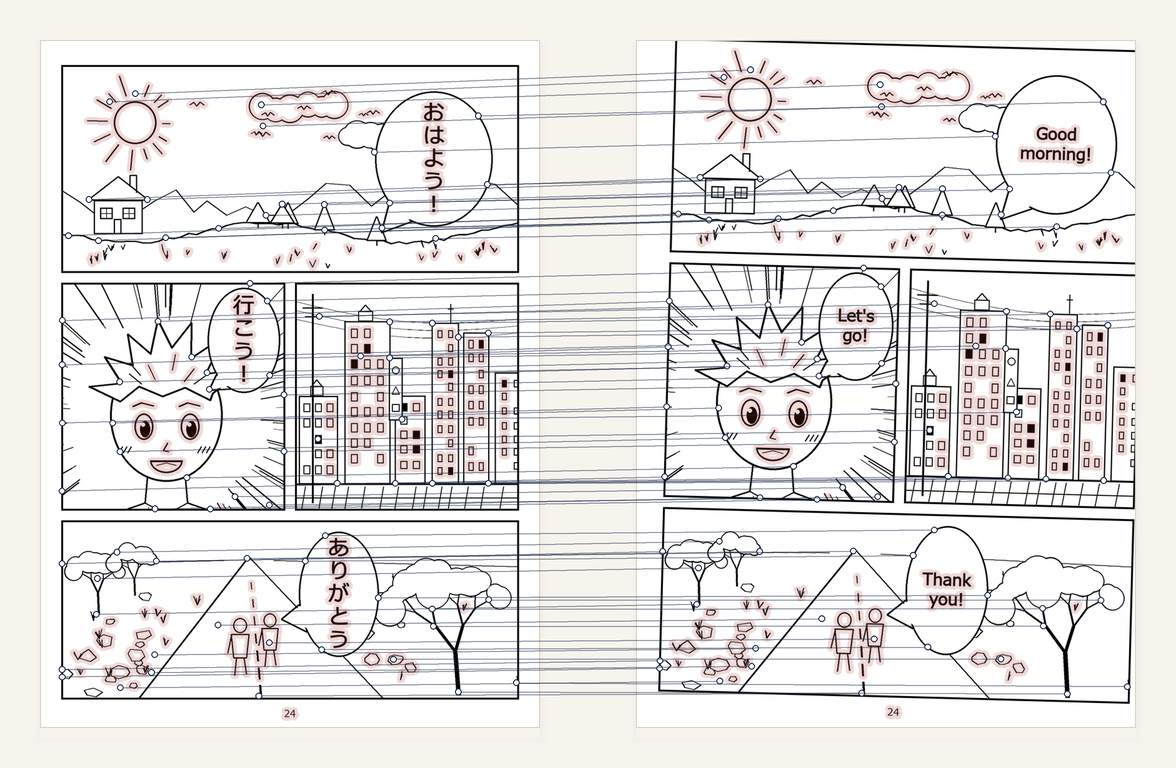
The figure shows some of the matches the core found between two sample pages we drew ourselves. The light red areas are small dark regions that look like text, which were left out of matching.

311
matching points kept for the sample pair (MAGSAC inliers)
0.13 px
median error of the matching points
4,734
lines of Python (19 files)
Sample pages, Japanese on the left and English on the right, with lines joining matching points on the drawings. The areas around the balloon text are tinted light red and are not used for matching.
Output of the page-matching core. Left: the Japanese sample; right: the English sample (both drawn in-house). The lines show 78 of the 311 matches kept.

02 · PC

Kasane-yomi for PC (round loupe)

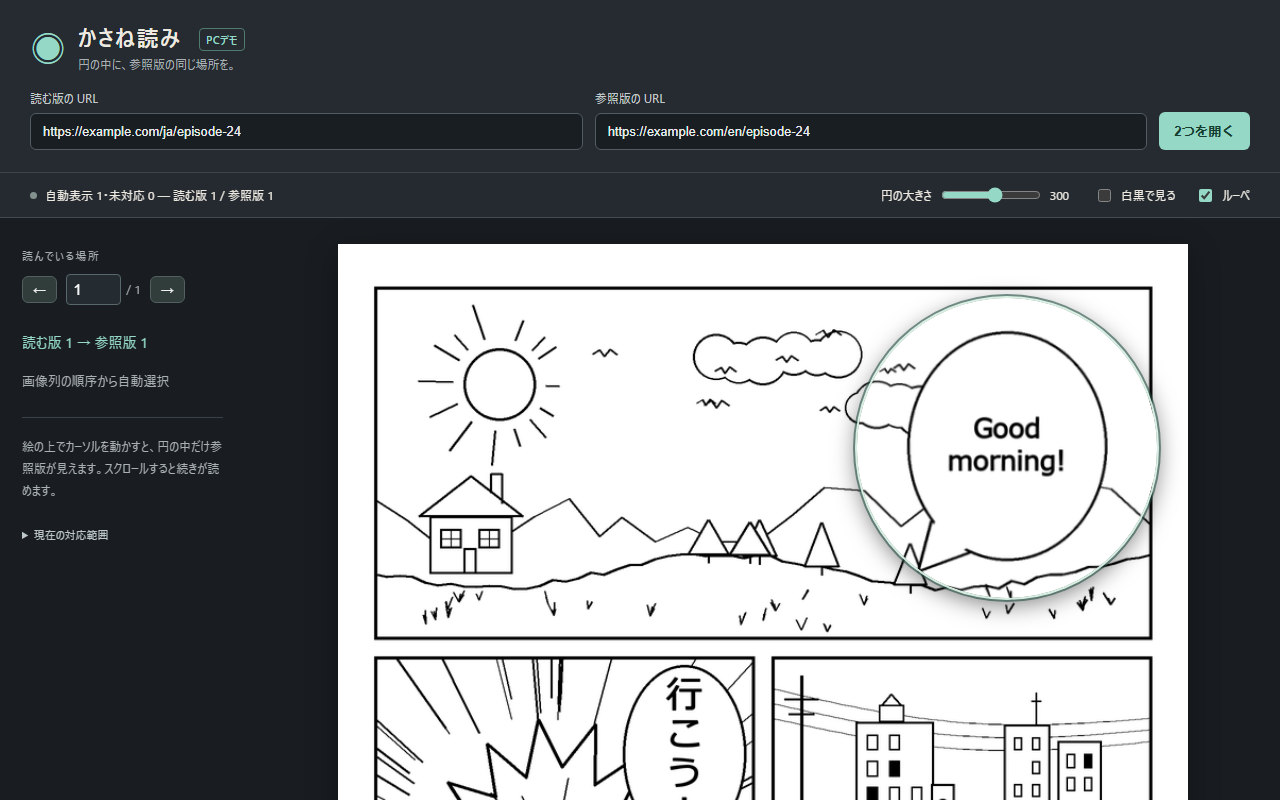
Enter the URLs of the edition you read and the reference edition, then open them. The app finds the partner of each page automatically; there is no manual step for choosing partner pages. Move the cursor over the page you are reading, and the same spot from the other edition appears inside the circle.

You can change the circle size and switch to black and white. Move between pages by scrolling or by entering a page number.

47
pages matched automatically to the correct partner page
63 / 58
images in the reading and reference editions in that run
2026.09
completed
The Kasane-yomi for PC screen. URL fields for the reading and reference editions are at the top, and an English balloon shows inside a circle over the page.
Sample screen, showing a page we drew ourselves. The URLs are examples.

03 · Android

Android app

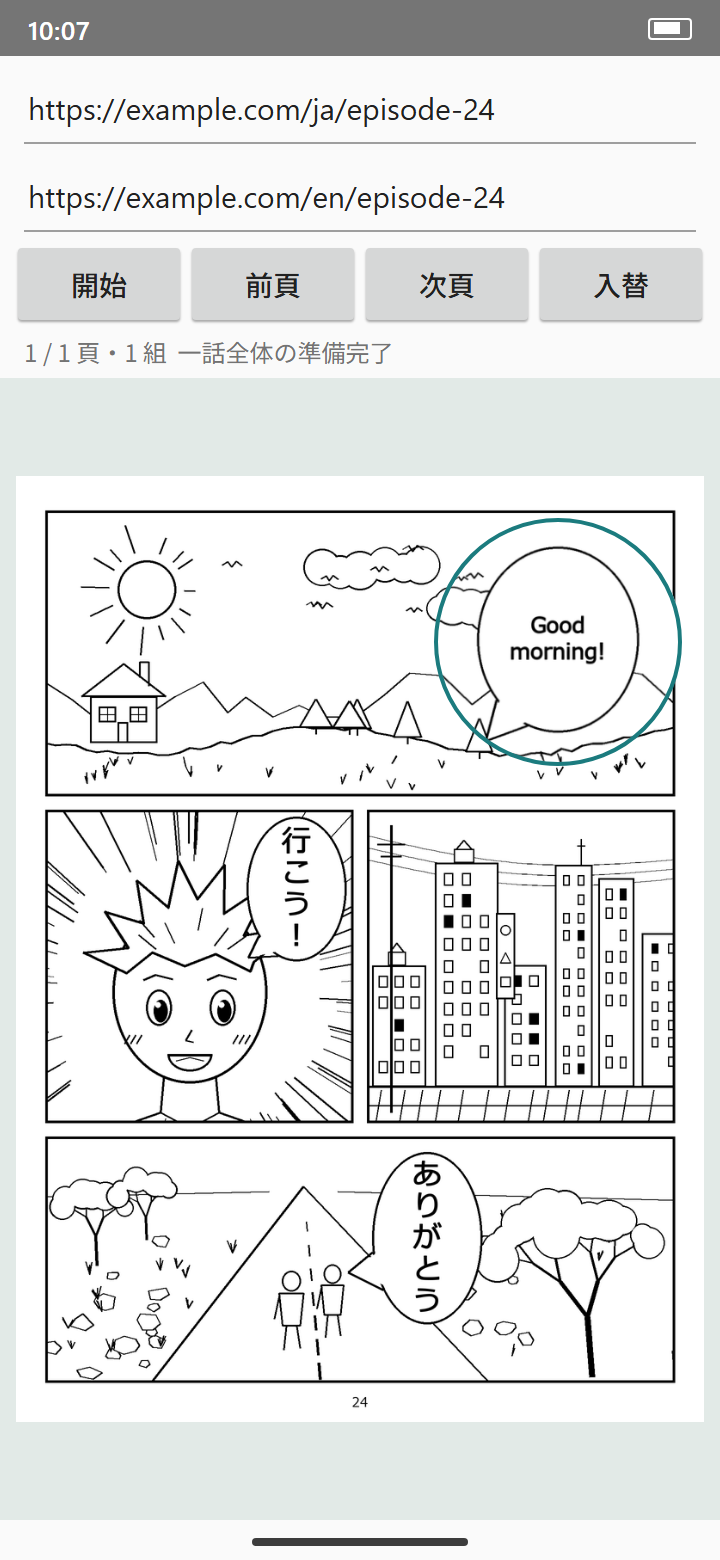
An app for reading on a phone, written in Kotlin. Enter the URLs of the edition you read and the reference edition, tap the start button, and the pages of the chapter are matched. Wherever you trace with a finger, a round window shows the other edition. You can move to the previous or next page and swap the two editions.

We built the Android app as two implementations: one with the full set of reading features, and one that layers all the images of a chapter at once. The second made 60 page pairs from the two editions of one chapter (64 and 58 pages), none of them wrong. Two-page spreads are paired one half at a time, so the number of pairs can exceed the number of pages.

22,898
lines of Kotlin in the implementation with the full set of reading features (134 files)
25,970
lines of unit and instrumented tests for the same implementation
60
page pairs from the whole-chapter implementation (0 wrong)
The Android app screen. Two URL fields and buttons to start, go to the previous or next page, and swap editions are at the top, and an English balloon shows inside a round window over the page.
Sample screen. It reproduces the app's layout (the URL fields; the start, previous-page, next-page and swap buttons; the status line; the round window) with a page we drew ourselves.

RESULTS

Tested on real editions

These results come from two language editions of published manga. The titles and images belong to their rights holders, so they do not appear on this page.

33pairs

The page-matching core searched 193 images of the Japanese edition for the partners of 57 images of the English edition and made 33 pairs, none of them wrong. Pages with no partner found were not layered (October 5, 2026; every pair checked by eye).

47pages

Kasane-yomi for PC matched 47 pages automatically to the correct partner page, from 63 images of the reading edition and 58 of the reference edition. The result was checked against an independent visual review (September 27, 2026).

60pairs

The Android app made 60 page pairs from the two editions of one chapter, none of them wrong. On a second title it made 54 pairs, again with none wrong (October 7, 2026; every pair checked by eye).

Enter two URLs, and the whole chapter is ready to read, layered page by page.

PRIVACY

No images on our servers

Manga images belong to the rights holders of each work. kasanegi handles images on the device only to layer the two editions that users have opened themselves.

  • ServerPage images are never sent to our servers, and our servers hold no images.
  • DeviceThe Android app's whole-chapter implementation keeps images in device memory only while they are shown layered.
  • StorageThis implementation does not save images as files. In testing, the app's cache and the storage it uses for display are inspected at the end of every run. Across 8 runs on October 7, 2026, no image file was found.
  • DemoThe demo on this page also runs entirely in your browser.

BUILT WITH CLAUDE

What Claude Code handled

Development of kasanegi is built around Claude Code. Claude Code designed and wrote the parts below.

Page-matching core
Designed and wrote the foundation of the core (including the alignment in align.py) and the page matching (pages.py), and integrated the components.
Order-independent matching
Designed and wrote the matching that pairs pages whose drawings agree, without assuming page order (September 8, 2026).
Demo
Wrote the demo on this page (in-browser alignment and the lens).
Development oversight
Handles design, standards, acceptance review and records.

ACCESS

We are inviting readers to try kasanegi

The PC beta has been well received, and more than twenty people have said they want to use it as a paid product. We welcome language learners. To take part, please email us.

Learning EnglishRead manga you know in Japanese with the English edition layered on top.
Learning JapaneseCheck scenes you know from the English edition against the Japanese balloons.
Learning another languageTell us which language you are learning.
contact@kasanegi.com →

Please include “kasanegi access” in the subject line.